
Unity APK vs AAB vs Google Play Download Size: Why the Numbers Don’t Match
Unity Android builds surface multiple size numbers: local APK, AAB, Google Play download size, and installed size. Here is what each one measures and how to compare them correctly.
Unity Android build size is one of the most consistently misunderstood metrics in mobile game development. Not because the tooling is broken, but because the pipeline produces several legitimate size numbers and teams often compare them as if they were interchangeable.
They are not. A local APK, a local AAB, Google Play’s download-size estimate, and installed size all describe different stages of the same delivery pipeline. Even within the same artifact type, configuration drift — a changed stripping level, a different compression method, or an accidentally enabled Development Build flag in CI — produces size deltas that look like regressions but aren’t. The artifact type is only half the requirement. The configuration has to match too.
| Size signal | What it measures | Best use |
|---|---|---|
| Local APK | A local build artifact, often universal and convenient for testing | Sideloading, QA, local validation |
| Local AAB | The publishing artifact uploaded to Google Play | Release packaging and store submission |
| Play download size | Estimated compressed download for a target device generated from the bundle | Store-facing decisions and release tracking |
| Installed size | Post-install footprint after unpacking and decompression | Storage impact, not store conversion |
The four Android build size numbers
1. Local APK size
A locally built APK is primarily a QA and distribution artifact. The modern Unity Android QA workflow typically routes APKs through Firebase App Distribution for tester delivery, or through Play Console's internal testing track for builds that need to exercise the actual Play delivery path. Sideloading directly to a device remains common for local device validation.
The important caveat: if your QA pipeline delivers APKs via Firebase while production goes through Play as an AAB, those two size numbers are structurally different. QA size and store download size are not the same measurement, even for the same code.
2. Local AAB size
An Android App Bundle is a publishing format, not a delivery format. You upload the AAB to Google Play. Players do not install the raw bundle directly. Instead, Google Play uses it to generate optimized APKs for specific device configurations.
3. Google Play download size
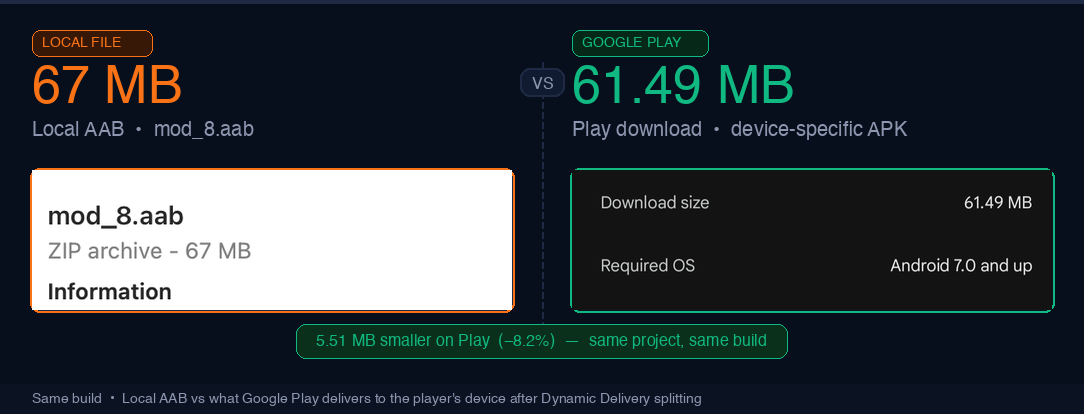
This is usually the most useful store-facing size metric. When you upload an AAB, Google Play's Dynamic Delivery infrastructure splits it into a base APK — containing core code and resources every device needs — plus a set of configuration APKs generated per ABI, screen density, and language. A player's device receives only the relevant combination for their hardware.
An arm64 Pixel and an x86 emulator get different splits from the same bundle. That is why Play Console shows a download-size estimate rather than a single fixed number, and why that estimate is consistently smaller than both your local APK and your raw AAB — neither of which has been through that splitting process.
4. Installed size
Installed size is the post-install footprint on the device after decompression and unpacking. It still matters for storage-constrained devices, but it answers a different question from download size and is not the right primary metric for store conversion or release-to-release package tracking.
One more caveat: starting in September 2025, Google Play no longer shows size-on-disk estimates in the app size and statistics reports. The concept still matters, but teams should not assume Play Console exposes it the same way it used to.
Why the numbers diverge
The numbers do not disagree because the tools are inconsistent. They differ because each number measures a different layer of the delivery pipeline: local build output, publishing artifact, device-specific delivery, and post-install storage footprint.
Related pipeline stages are not interchangeable metrics. Most Android size confusion comes from comparing across those boundaries and then treating the delta as if it reflected a real regression.
Why asset breakdown and final build size do not match
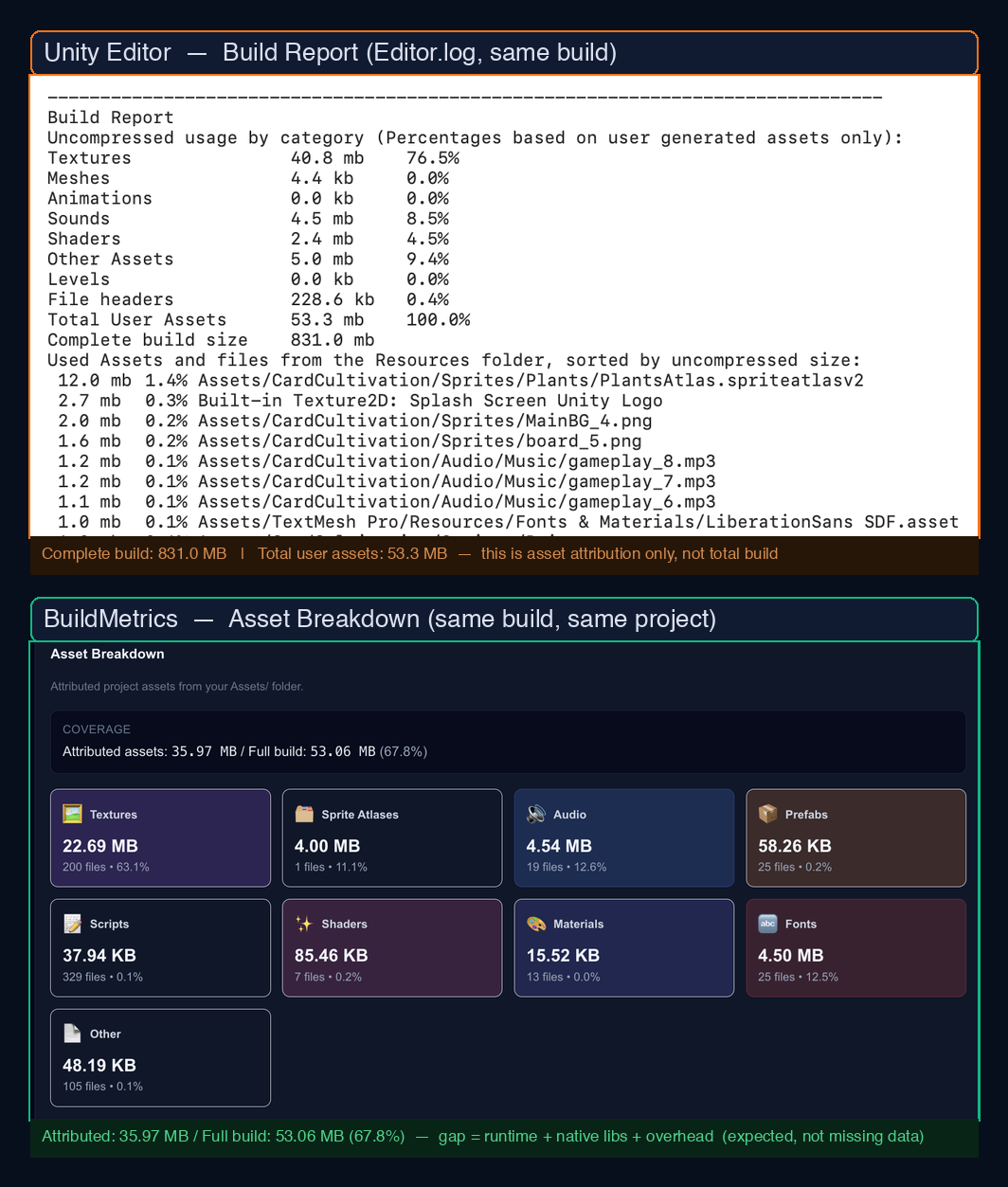
This is the second major source of confusion. Unity’s BuildReport and PackedAssets data are useful for understanding which project assets contribute to packed files. That answers an attribution question.
Final build output answers a different one. It includes project assets, but also runtime libraries, native code, processed resources, compression effects, stripping results, and packaging overhead. So when attributed asset size does not add up to total build size, that is expected behavior, not a measurement bug.
Why development and release builds must not be compared
Development builds are not just release builds with extra logs. They often include debugging support, profiler connectivity, symbols, and additional diagnostics that do not belong in the release artifact. Teams also frequently change compression or debug-related settings at the same time, which makes the comparison even noisier.
That means a development build and a release build are different artifacts. Comparing them and treating the delta as a product regression generates false positives.
The comparison matrix
| Comparison | Valid? | Why |
|---|---|---|
| Release AAB this week vs release AAB last week, same config | Yes | Same artifact type, same layer |
| Play download estimate across two release builds | Yes | Good store-facing comparison |
| Local AAB vs Play download estimate | No | Publishing artifact vs delivered artifact |
| Dev build vs release build | No | Different configurations |
| Asset-attribution total vs final build size | No | Different datasets |
| Local APK vs Play download size | No | Different pipeline stages |
What a real size regression looks like
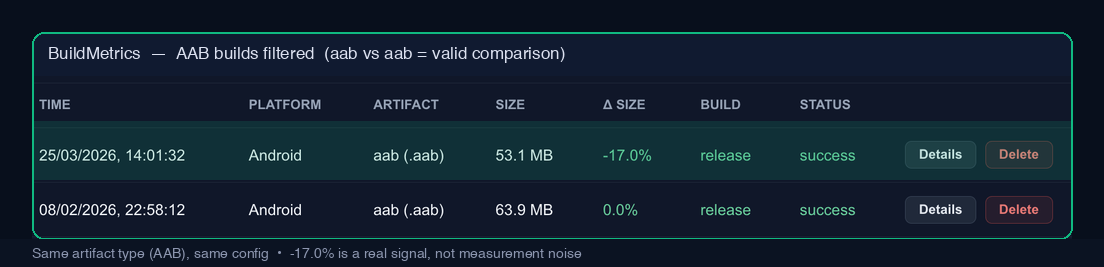
A real regression is a size change between two builds where platform, artifact type, build configuration, compression settings, stripping settings, and delivery model are held constant.
If any of those changed, you are not measuring a product regression yet. You are measuring configuration drift. That is why artifact tracking matters so much inside Build Metrics.
What actually moves Android size in Unity
If your Play download size is larger than expected, the levers that usually matter most are texture compression and targeting, managed code stripping, Addressables strategy, and Play Asset Delivery.
For larger Android titles shipping as AABs, the modern path is Play Asset Delivery or Play Feature Delivery. Unity’s older Split Application Binary and OBB workflow belongs to the pre-AAB era and should not be treated as the modern Google Play recommendation.
If you want an offline approximation of device-targeted output, bundletool is useful. For store-facing release evaluation, Play Console’s generated download estimate remains the more practical benchmark.
A better way to track size over time
A single build size number is less useful than a consistent series of comparable ones. What matters is not “how big is this build?” in isolation. What matters is “how does this build compare to the last build with the same artifact type and the same configuration?”
That is the comparison that surfaces actual regressions instead of wasting time on packaging differences, delivery differences, or debug overhead. It is also why the Build Metrics docs emphasize explicit config tracking, CI/CD integration, and regression alerts.
FAQ
Why is Google Play download size smaller than my AAB?
Because players do not download the raw app bundle. Google Play generates device-specific APKs from the bundle and serves only what the target device needs.
Should I track APK size, AAB size, or Play download size?
Track the metric that matches the decision. Use Play download size for store-facing impact, AAB size for publishing workflow consistency, and APK size for local testing or direct distribution scenarios.
Why does Unity BuildReport not add up to final build size?
Because project asset attribution is only one slice of the shipped output. Runtime libraries, native code, processed resources, compression, and packaging overhead all contribute too.
Sources
- Android Developers: App Bundle overview
- Android Developers: bundletool
- Google Play Console Help: app size guidance and limits
- Google Play Console Help: create and set up your app
- Unity Scripting API: BuildReport
- Unity Scripting API: PackedAssets
- Unity Manual: managed code stripping
Build Metrics
Compare the same artifact, under the same config, every time.
Build Metrics tracks artifact type, platform, and configuration so Android size comparisons stay apples-to-apples. That keeps teams focused on real regressions instead of comparison mistakes.